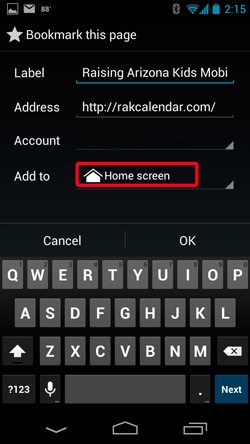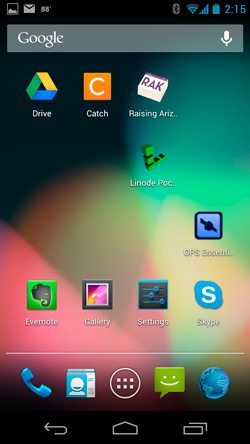


Follow these directions to put the RAK Calendar icon on your iPhone/iPad or Android* smartphone. Keep in mind that not all Android screens will display the same.
START by going to https://rakcalendar.com
OR use your QR reader and the code at left to capture the URL. (Don’t have a QR reader? Get one free for iPhone/iPad or Android.)
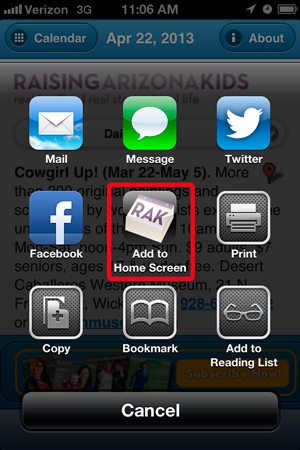
Directions for iPhone/iPad1. To bookmark the webpage and add it to your Homepage, touch the “share” button at the bottom of the screen.
2. Then touch Add to Home Screen.
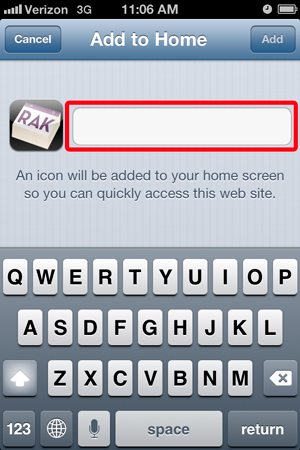
3. Name your icon.
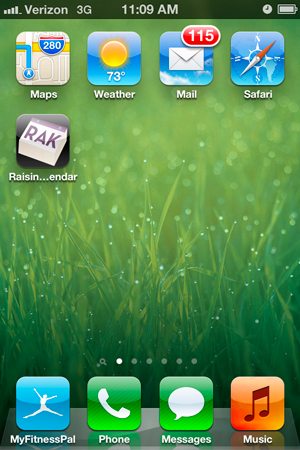
4. Your icon should now be saved to your Homepage.
|
 |
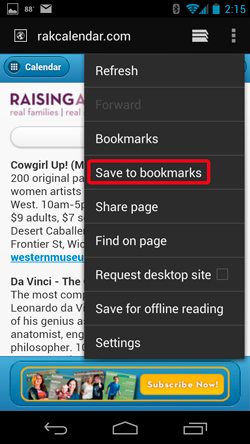
Directions for Android1. To bookmark the webpage and to add it to your homepage, touch anywhere on the screen and drag to your menu icon.
2. Select the menu icon and a drop-down menu will appear.
3. Select Save to create a bookmark from the drop- down menu.
4. Go to “Add to” and select Home screen.
5. Your icon should now be saved to your Homepage. Click and use!
|